Your API keys,
locked in one file.

Keyfold keeps API keys by project and environment, plus your passwords and 2FA codes, in one encrypted file on your computer. Paste any of them in two keystrokes, and let your AI agent use them without ever seeing them.

Get Keyfold See it work
One-time purchaseNo subscriptionNo accountNo telemetrymacOS 12+Windows 10/11
Suman Kumar
I had API keys in .env files, notes and old chats, and every AI tool wanted them pasted in. So I built Keyfold: one locked file on my computer, and agents that use keys without seeing them.
Suman Kumar, made Keyfold · @CodeWithKolin
Keyfold · live demoOpen full screen

Try it: every button works. The keys are made up, because a web page can't read your vault, and shouldn't.
click a key · Copy · ⌘K to search · Passwords › GitHub for a 2FA code

See it work

Copy a key, approve an agent, lock

Made from real Keyfold screens.

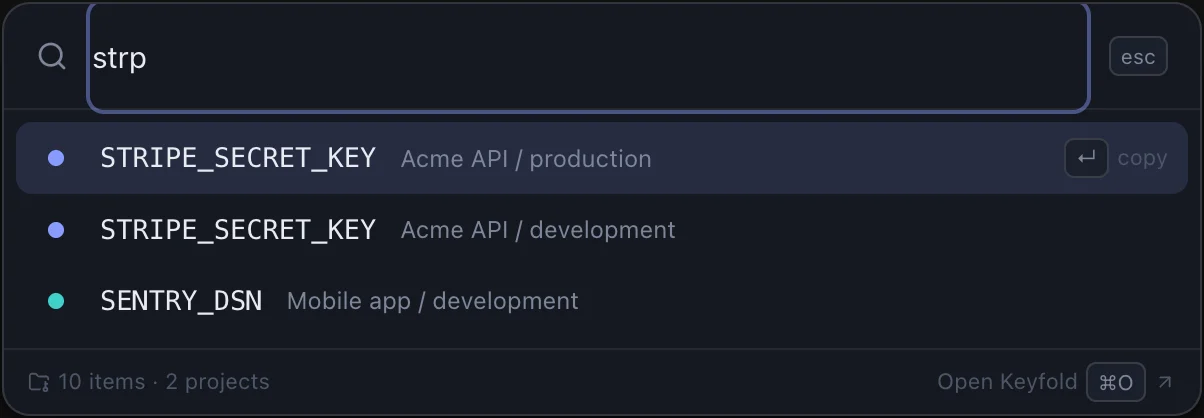
Paste any key in two keystrokes

Press ⌘⇧K in any app, type three letters, press Enter. The value is on your clipboard, and Keyfold clears it again 30 seconds later. Option-Enter copies a login's 2FA code.

⌘⇧K · 3 letters · Enter · clears in 30 s
Try the quick panel →
The quick paste panel searching for strp

Your agent uses the key. It never sees it.

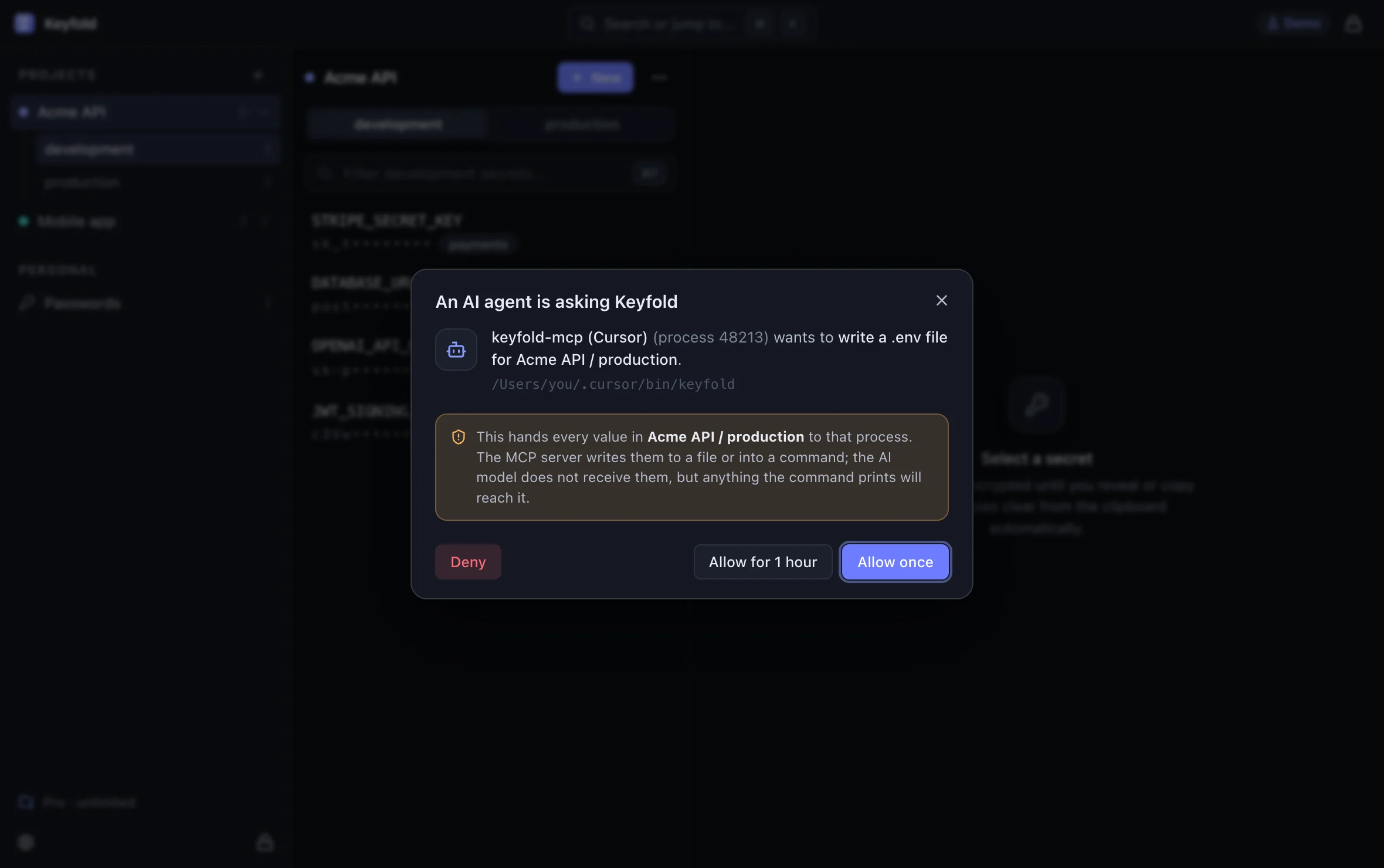
Cursor, Claude Code and other MCP clients can write a .env file or run a command with your keys injected. Every request shows up in Keyfold first, and no tool ever returns a value to the model.

7 MCP tools · 0 return secret values · every request approved
See an approval →
An AI agent asking Keyfold to write a .env file, with Deny, Allow for 1 hour and Allow once

Every key knows where it belongs

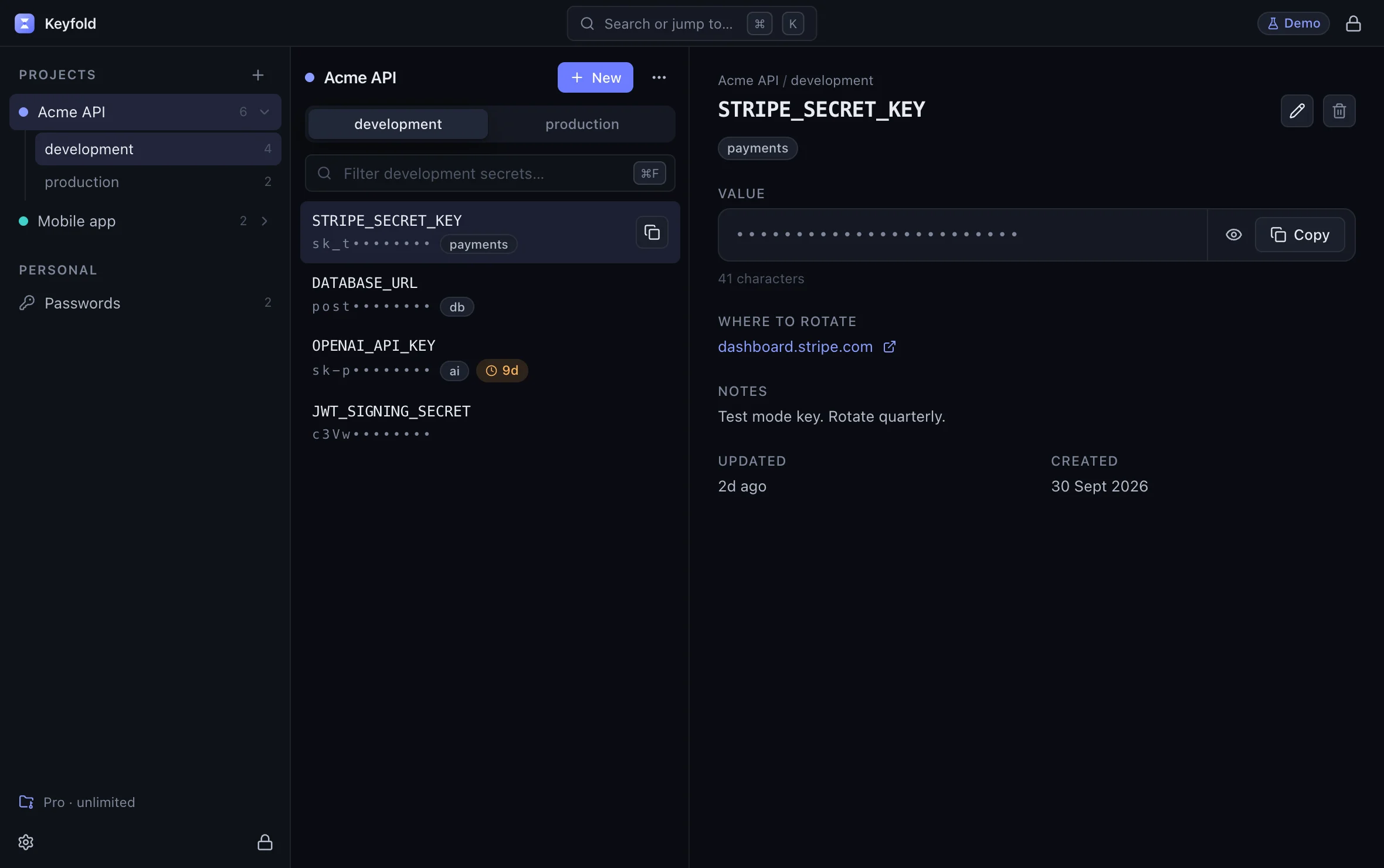
Projects hold environments, environments hold keys. Each key keeps its notes, tags, where to rotate it and when it expires, and the list warns you before it does.

projects › environments › keys · expiry warnings
Browse the demo vault →
A Stripe secret key in the Acme API development environment

Notices the keys you forgot to save

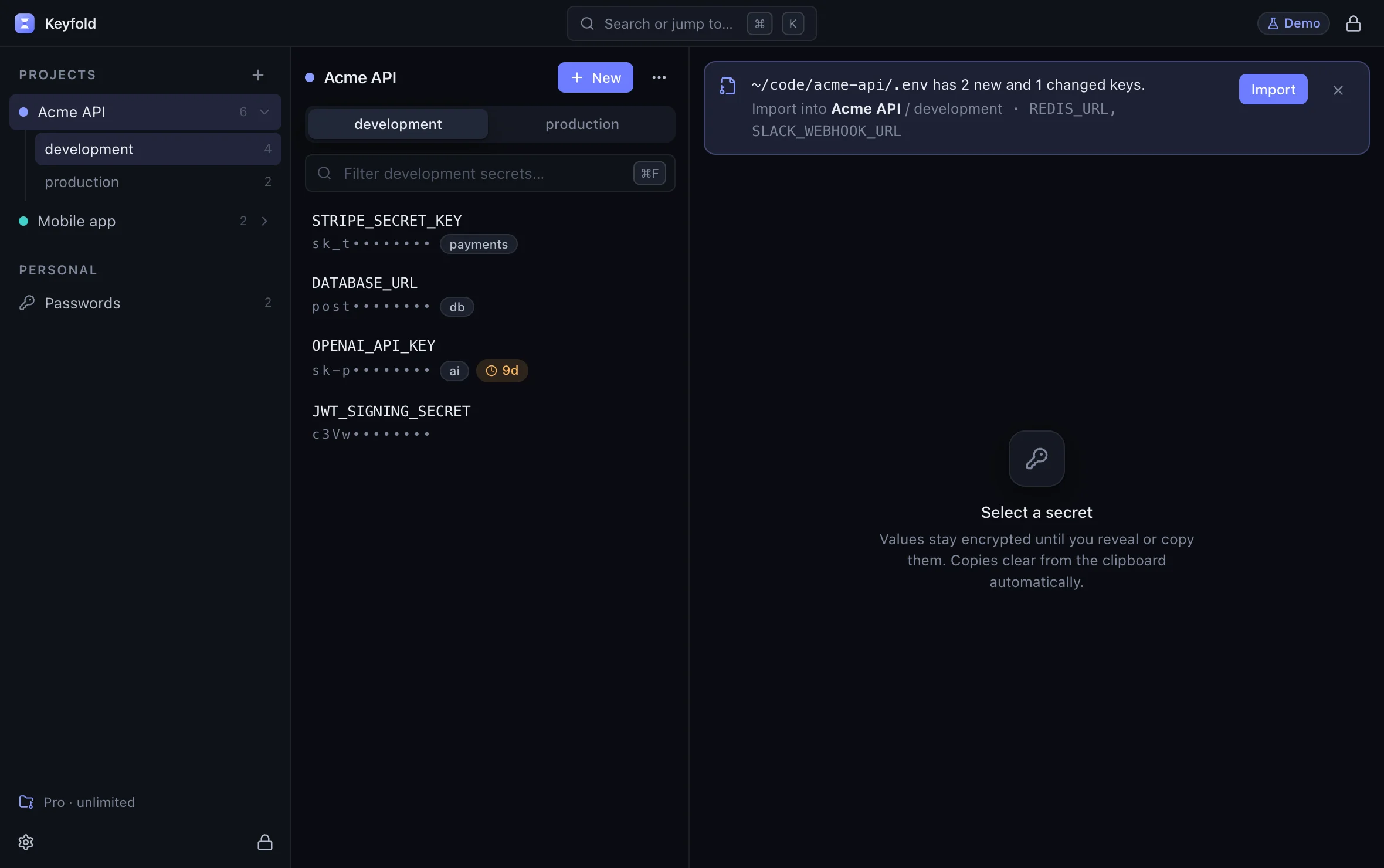
Turn it on and Keyfold spots API keys you copy and new keys in your projects' .env files, then offers to import them. Matching happens in memory; nothing is stored until you click.

25 key formats · off by default · saved only when you click
See a detection →
Keyfold noticing two new keys in a project's .env file

.env in, .env out

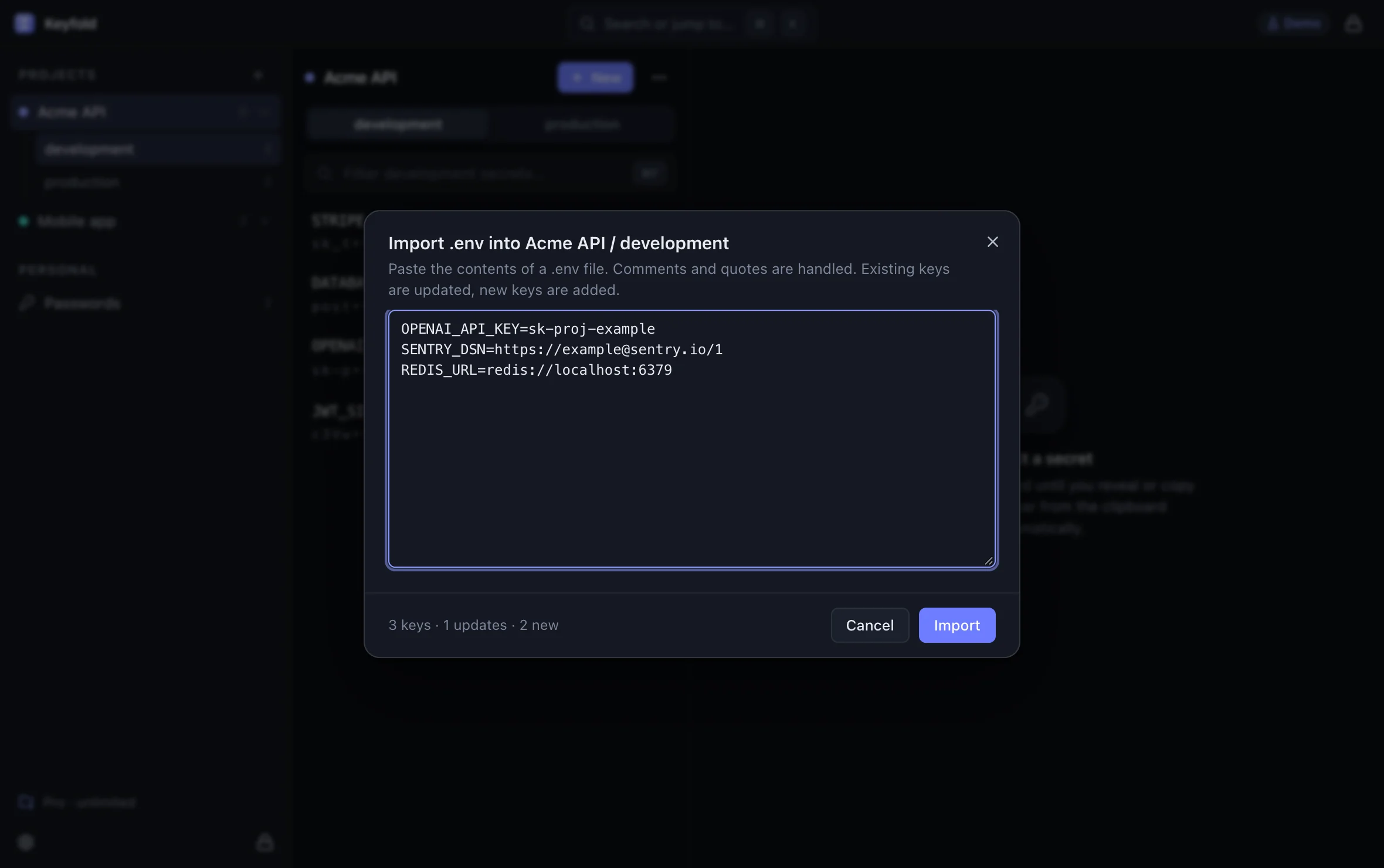
Paste a .env file to fill an environment in one go; Keyfold shows what's new and what changes before it saves. Export an environment back to a file whenever a tool needs one.

3 keys found · 1 update · 2 new
Importing a .env file into Acme API development

Passwords and 2FA codes, next to your keys

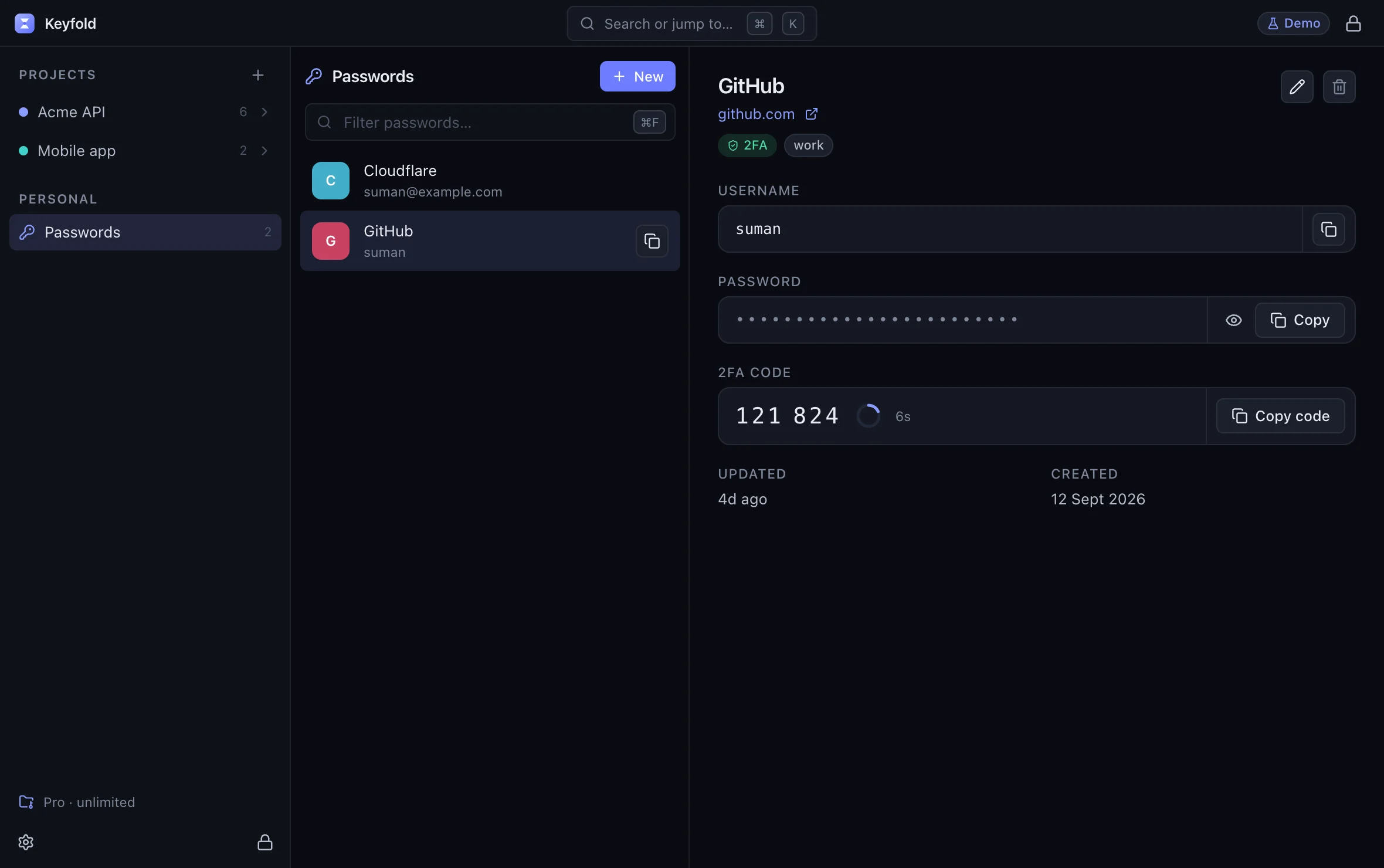
Logins live in the same vault, with a strength meter that shows real crack times. Save a site's 2FA secret and Keyfold shows the code, counting down, computed on your computer.

RFC 6238 · SHA-1, SHA-256, SHA-512 · otpauth links
Open Passwords in the demo →
A GitHub login with a live 2FA code

Nothing leaves your computer.

No server holds your vault, so there is nothing to breach. Three things keep the file itself safe.

1

Encrypt

Your vault is one file, sealed with XChaCha20-Poly1305 under a key stretched by Argon2id. Change one byte and it refuses to open.

argon2id · 64 MiB · 3 passes
xchacha20-poly1305
✓ every byte authenticated
2

Unlock

Only your passphrase opens it. There is no account, no server and no reset email. Touch ID and Windows Hello are next.

passphrase · ············
strength meter · real crack times
✓ Recovery Kit saved
3

Lock

Keyfold locks itself when you step away and clears copied values from the clipboard. Locking wipes the key from memory.

auto-lock after 5 min idle
clipboard clears in 30 s
✓ key wiped on lock

Recovery Kit, not a reset email

A printable code is the only other way in. Nobody else holds a copy, including us. Keyfold also keeps the last five encrypted copies of your vault beside it.

Open-source where it matters

The encryption, vault format, licence check, 2FA codes and the MCP server are open source under AGPL. Read the code or the security notes.

Compare

Built for developer secrets. Priced like a tool, not a subscription.

Keyfold1PasswordBitwardenKeePassXCPlain .env files
Works without an accountYesMembership requiredAccount required, even self-hostedYesYes
Encrypted on diskYesYesYesYesPlain text
API keys by project and environmentYesEnvironments, in the desktop appSecrets Manager, a separate productGroups and tagsOne file per environment
AI agents use keys without seeing valuesYes, each request approvedEnvironments MCP serverIts MCP server returns valuesNo official integrationAgents can read the file
Quick-paste hotkey⌘⇧K, any appQuick AccessNot yetAuto-TypeNo
Spots keys you copy or leave in .env filesBoth, opt-inFlags .env filesNoNo–
Open sourceEncryption, CLI, MCP (AGPL)NoMostly (GPL, AGPL)Yes (GPL)–
PriceOne-time, $5 to $29$47.88 a yearFree; Premium $19.80 a yearFreeFree

Based on each vendor's own docs and pricing pages, checked 12 October 2026. Spotted something out of date? Email support@keyfold.app.

No account

No sign-up, no login, no email needed to use it. Your licence is a signed text that works offline.

No telemetry

No usage events, no crash reporter, no analytics inside the app.

No network, unless you allow it

The only connection Keyfold can make is a daily update check on the Mac, and it asks you first.

Full privacy policy

Requirements
macOS 12 or later
Apple silicon and Intel
Windows 10 and 11
Price
One-time payment
Every computer you own
No subscription
Latest version
Keyfold 0.1.0
Not released yet
Changelog
Made by
Suman Kumar
Independent developer
@CodeWithKolin

Pay once. No subscription.

Free for 1 project and 25 items, with every security feature. Pro removes the limits.

Keyfold Pro, lifetime
$29 once
Launch pricing for the first 30 buyers
  1. First 10 buyers$5
  2. Next 20 buyers$10
  3. Everyone after$29
  • Unlimited projects and items
  • 2FA codes for your logins
  • Encrypted backup export and restore
  • Every 1.x update
Get Keyfold
Billed in USD by Dodo Payments: cards, PayPal, UPI. Local tax is added where it applies and shown before you pay.
After you pay
  1. Download startsOn the next page, and always at keyfold.app/download.
  2. Your licence appearsOn the thank-you page, and by email from licences@keyfold.app.
  3. Paste itSettings › Licence. It's checked on your computer; no internet needed.
  4. New computer?Paste the same licence. It works on every computer you own.

Buying on your phone works too: the licence arrives by email, and you download Keyfold on your computer.

14-day refund, no questions asked.

Questions

Something else? Email support@keyfold.app and a person replies.

The app
Is it a password manager too?

Yes. Logins with usernames, passwords, notes and 2FA secrets live in the same vault as your API keys. Keyfold is built around developer secrets first, so it has no browser autofill yet.

Where is my data stored?

In one encrypted file on your computer, in your user account's app data folder by default. You choose where it lives, and you can back it up like any other file.

Does it run on Mac and Windows?

Yes. macOS 12 or later on Apple silicon and Intel, and Windows 10 and 11 through the Microsoft Store. The same vault file opens on both.

What can the AI agent actually see?

Project and key names, counts, exit codes and the output of commands you approved. Never values: no tool returns one, and every request waits for your approval in Keyfold.

How do I sync between computers?

Today, by keeping the vault file in a folder you already sync, such as iCloud Drive or Dropbox. Built-in sync with conflict handling is on the roadmap.

Buying
What happens after I buy?

You come back to keyfold.app, your download starts and your licence appears on the page. It's also emailed to you. Paste it in Settings › Licence.

I lost my licence

Email support@keyfold.app from the address you bought with and we'll send it again.

Is tax included in the price?

No. Prices are in USD before tax. Dodo Payments, the merchant of record, adds VAT, GST or sales tax where your country charges it and shows the total before you pay.

Can I get a refund?

Yes, within 14 days, no questions asked. Email support@keyfold.app.

Is it on the App Store?

No. The Mac app is downloaded from keyfold.app and checked by Apple's Gatekeeper; the Windows app comes from the Microsoft Store.

Privacy and security
Does Keyfold connect to the internet?

Only if you let it. On the Mac, Keyfold asks once whether to check for updates daily: one request to GitHub for a small version file, and every update is verified against a signature built into the app. Say no and it never connects.

What if I forget my passphrase?

Use the Recovery Kit you saved when you created the vault, then set a new passphrase. Without either, nobody can open the vault, including us. That is what keeps it safe.

Has the code been audited?

Not yet by an outside firm. The encryption uses audited RustCrypto libraries, the test suite flips every byte of a vault to prove tampering is caught, and the core is open source so anyone can review it.

Lock your keys away.

One-time purchase · every computer you own · macOS 12+ · Windows 10/11
Already bought? Download Keyfold